
Overview
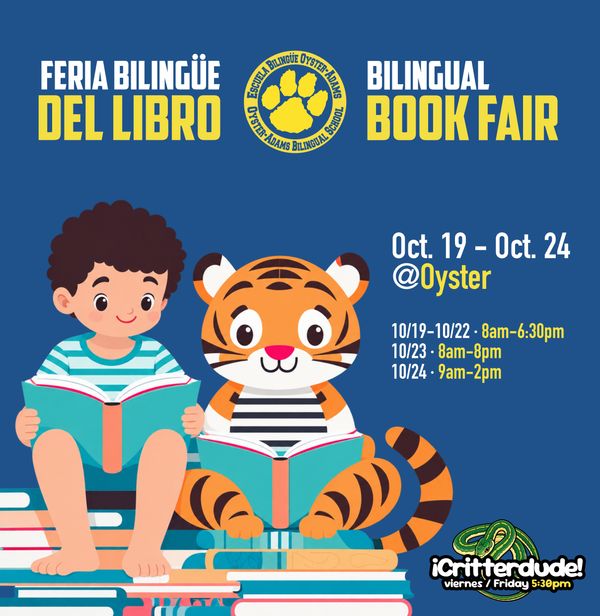
What: Oyster-Adams Bilingual Book Fair
Where: Oyster Campus
When: October 19th-24th (flyer below with times)
Who: Open to everyone: students, teachers, parents, grandparents, neighbors...
For 31 years Oyster-Adams has held one of the largest bilingual book fairs in the country. We have hundreds and hundreds of books in Spanish (many originally written in Spanish), bilingual books, and books in English. We hope you'll come visit - it's a peaceful and inspiring space that encourages a love of reading for all of our tigres. We need A LOT OF HELP to keep things running smoothly. Please sign up to volunteer!
Thanks to your donations to the OCC Annual Fund, the OCC is able to make sure that EVERY Oyster-Adams student can buy a book at the Book Fair. Families who might not otherwise be able to purchase books will receive a voucher for a book ($15 for Oyster, $20 for Adams). Thank you!
Volunteer
We are looking for volunteers to help set-up and staff the fair. No experience necessary! We need people to set up & break down, and to sell books, help guide shoppers and tidy up. Grandparents are welcome, too! Sign up here.
Prepare For Your Child's Visit
Your child will visit the Book Fair during school - to prepare, you can:
Add your credit card to eWallet so your child can shop at school (see instructions below).
Send your child with cash - not recommended, but if you do, please put it in an envelope with their name on it!
Come to the Book Fair with your child! You're welcome to join while your child is visiting the Book Fair (see class schedules below) or you can visit any time the Book Fair is open (see the attached list of hours) and pay using a credit card, cash, or check.
You can send cash with your child, but the faster/safer/better option is to set up an eWallet account for them on the Bookworm Central website. (See directions below.)
The eWallet account stores your credit card information, but your card is NOT charged until your child buys something at the Book Fair. (And you set the maximum limit for charges.)
Whether your child brings an eWallet bar code or cash to school, please have them keep it in an envelope labeled with their name and class and your cell phone number to minimize loss and confusion.
Please support our staff by purchasing books from the Staff Wish Lists.
On Friday, 10/23, Walter the Critterdude will visit the Book Fair! He will bring some of his cold-blooded friends for a visit from 5:30-6:30pm
When Will My Child Visit The Book Fair?
Oyster-Adams students get to visit the book fair during their scheduled library time below. Adams students will walk to the Oyster campus with Adams librarian, Mr. Burch. Parents are welcome to come anytime; if you'd like to be there when your child's class visits the Fair, consult the class schedule:
PreK
- PKA: Monday 9:55-10:55am
- PKB: Wednesday 9:55-10:55am
Kindergarten
- KA: Wednesday 1:00-2:00pm
- KB: Tuesday 1:00-2:00pm
- KC: Monday 1:00-2:00pm
- KD: Thursday 1:00-2:00pm
First grade
- 1A: Wednesday 2:15-3:15pm
- 1B: Tuesday 2:15-3:15pm
- 1C: Monday 2:15-3:15pm
- 1D: Thursday 2:15-3:15pm
Second grade
- 2A: Wednesday 11:00-12:00pm
- 2B: Tuesday 11:00-12:00pm
- 2C: Monday 11:00-12:00pm
- 2D: Tuesday 9:55-10:55am (UPDATED)
Third grade
- 3A: Thursday 8:45-9:45am
- 3B: Tuesday 8:45-9:45am
- 3C: Wednesday 8:45-9:45am
- 3D: Monday 8:45-9:45am
Fourth grade
- Tuesday, staggered groups starting at 9:15am
Fifth grade
- Wednesday, staggered groups starting at 12:30
Sixth grade
- Wednesday, staggered groups starting at 9:15am
Seventh grade
- Thursday, staggered groups starting at 9:15am
Eighth grade
- Tuesday, staggered groups starting at 1:30pm
How to sign up or refresh your child's account for eWallet
You can watch this video or follow the steps below:
On the Bookworm Central eWallet page, scroll down to either Log In or Register.
If you opened an eWallet last year, you will need to update your child's information (teacher, class, maximum spending limit) and re-enter your credit card information.
*Important*: Please double check the phone number associated with your Bookworm profile as this is the way we will identify eWallets this year.
Enter your name and contact information and create a password. For returning users, edit your child's information and enter your credit card information using the Update Credit Card button.
For new users, check your email account for a verification email. Click the button that says Verify Email.
Then you can sign in by entering your email address and password under Returning Users.
Enter your child's name, the school name (Oyster-Adams Bilingual School), the maximum amount your child can spend, and their grade (teacher is optional).
Next, click Add/Update credit card details, and enter your credit card number, expiration date, three digit code (usually on the back of the card), and your billing zip code
Then click Pay - note that your card WILL NOT be charged until your child checks out at the Book Fair. You should see the card on file and you can edit or update any of your information.
Click Add Student on the left to add siblings so they have their own barcode. You will need to enter your credit card information again for each student.
Everyone: You can either print the eWallet from the website or write down on a sheet of paper the phone number associated with your Bookworm profile, your child's name and spending limit. If you choose to print the eWallet page, please write your associated phone number on the paper. Your child needs to have this paper with them on the day of the Book Fair. Especially for younger children, it is very helpful to have the spending limit written on their paper so adults can guide them to appropriately priced books.
Buy Books for Your Child's Classroom (Teacher Wish Lists)
All teachers and staff have the opportunity to create Wish Lists for their classrooms in the Book Fair. Encourage your child's teachers to fill out their Wish Lists! You can find their name on the Wish List board near the cashiers - grab their Wish List, find a book, and purchase it!
Social Media Flyer