
- @ 8am - 4pm
Resumen
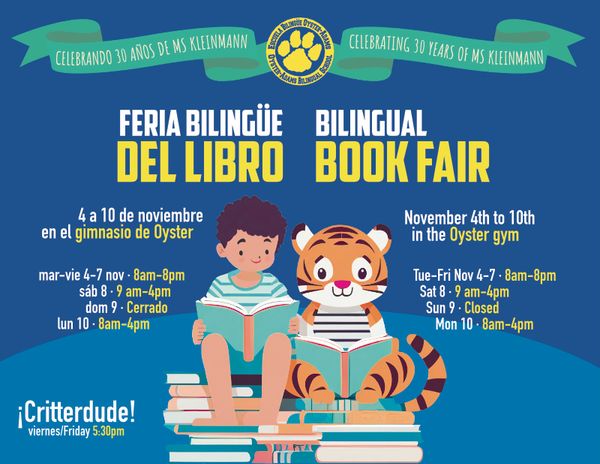
Qué: Feria del Libro Bilingüe de Oyster-Adams
Dónde: plantel de Oyster
Cuándo: del 4 al 10 de noviembre (volante abajo con horarios)
¡Celebrando 30 Años de la Sra. Kleinmann!
¡Nuestra Feria del Libro regresa comenzando el martes, 4 de noviembre! Esperamos que consideres apoyar la Feria del Libro de Oyster-Adams y nuestra increíble biblioteca bilingüe. Tus compras apoyan la lectura de tus hijas y/o hijos en casa y en la escuela - ¡el 25% de los fondos recaudados regresan a OA!
Voluntariado
Estamos buscando voluntarios de aula para ayudar a montar y atender la feria. ¡No se necesita experiencia! Regístrate aquí
o haciendo clic en este registro para voluntarios: https://www.signupgenius.com/go/10C0A4CA5AA2AA3FAC34-59516552-oysteradams#
¡Siéntete libre de registrarte para más de un turno, y gracias por hacer posible esta tradición de OA!
Prepárate para la visita de los estudiantes
Tus hijas y/o hijos visitarán la Feria del Libro durante la escuela - para prepararte, puedes:
Agregar tu tarjeta de crédito a eWallet para que tus hijas y/o hijos puedan comprar en la escuela (ver instrucciones abajo).
Enviar a tus hijas y/o hijos con efectivo - no recomendado, pero si lo haces, ¡ponlo en un sobre con su nombre!
¡Ven a la Feria del Libro con tus hijas y/o hijos! Estás invitado a unirte mientras tus hijas y/o hijos están visitando la Feria del Libro (ver aquí) o puedes visitar en cualquier momento que la Feria del Libro esté abierta (ver la lista adjunta de horarios) y pagar usando una tarjeta de crédito, efectivo o cheque.
Puedes enviar efectivo con tus hijas y/o hijos, pero la opción más rápida/segura/mejor es crear una cuenta de eWallet para ellos en el sitio web de Bookworm Central. (Ver direcciones abajo.)
La cuenta de eWallet almacena la información de tu tarjeta de crédito, pero tu tarjeta NO se carga hasta que tus hijas y/o hijos compran algo en la Feria del Libro. (Y tú estableces el límite máximo para los cargos.)
Ya sea que tus hijas y/o hijos traigan un código de barras de eWallet o efectivo a la escuela, por favor pídeles que lo mantengan en un sobre etiquetado con su nombre y clase y tu número de teléfono celular para minimizar la pérdida y la confusión.
Por favor, apoya a nuestro personal comprando libros de las listas de deseos del personal.
¡El viernes, 7 de noviembre, Walter el Critterdude visitará la Feria del Libro! ¡Él traerá a algunos de sus amigos de sangre fría para una visita de 5:30 a 6:30 pm!
¿Cuándo Visitarán Mis Hijas y/o Hijos la Feria del Libro?
Los estudiantes de Oyster-Adams visitarán la feria del libro durante su tiempo programado en la biblioteca a continuación. Los estudiantes de Adams caminarán al plantel de Oyster con el bibliotecario de Adams, Sr. Burch.
PreK
- PKA: Jueves 9:55-10:55 am
- PKB: Martes 9:55-10:55 am
Jardín de Niños
- KA: Martes 1:00-2:00 pm
- KB: Miércoles 1:00-2:00 pm
- KC: Jueves 1:00-2:00 pm
- KD: Lunes 1:00-2:00 pm
Primero
- 1A: Martes 2:15-3:15 pm
- 1B: Miércoles 2:15-3:15 pm
- 1C: Jueves 2:15-3:15 pm
- 1D: Lunes 2:15-3:15 pm
Segundo
- 2A: Martes 11:00-12:00 pm
- 2B: Miércoles 11:00-12:00 pm
- 2C: Jueves 11:00-12:00 pm
- 2D: Lunes 11:00-12:00 pm
Tercero
- 3A: Martes 8:45-9:45 am
- 3B: Miércoles 8:45-9:45 am
- 3C: Jueves 8:45-9:45 am
- 3D: Lunes 8:45-9:45 am
Cuarto
- Miércoles, clases escalonadas de 9:15-11:00 am
Quinto
- Jueves, clases escalonadas de 12:15-2:00 pm
Sexto
- Miércoles, clases escalonadas de 2:00-3:15 pm
Séptimo
- Jueves, clases escalonadas de 9:15 am-10:15 am
Octavo
- Viernes, clases escalonadas de 2:00 pm-3:00 pm
Cómo registrarte o actualizar la cuenta de eWallet de tus hijas y/o hijos
En la página de eWallet de Bookworm Central, desplázate hacia abajo hasta Iniciar Sesión o Registrarse.
Si abriste un eWallet el año pasado, necesitarás actualizar la información de tus hijas y/o hijos (maestro, clase, límite máximo de gasto) y volver a ingresar la información de tu tarjeta de crédito.
*Importante*: Por favor verifica el número de teléfono asociado con tu perfil de Bookworm ya que esta será la forma en que identificaremos los eWallets este año.
Ingresa tu nombre e información de contacto y crea una contraseña. Para los usuarios que regresan, edita la información de tus hijas y/o hijos e ingresa la información de tu tarjeta de crédito usando el Actualizar tarjeta de crédito botón.
Para nuevos usuarios, revisa tu cuenta de correo electrónico para un correo de verificación. Haz clic en el botón que dice Verificar correo electrónico.
Luego podrás iniciar sesión ingresando tu dirección de correo electrónico y contraseña bajo Usuarios que regresan.
Ingresa el nombre de tus hijas y/o hijos, el nombre de la escuela (Escuela Bilingüe Oyster-Adams), el monto máximo que pueden gastar, y su grado (el maestro es opcional).
A continuación, haz clic en Agregar/Actualizar detalles de la tarjeta de crédito, e ingresa tu número de tarjeta de crédito, fecha de expiración, código de tres dígitos (generalmente en la parte posterior de la tarjeta), y tu código postal de facturación.
Luego haz clic en Pagar - ten en cuenta que tu tarjeta NO SE CARGARÁ hasta que tus hijas y/o hijos hagan el pago en la Feria del Libro. Deberías ver la tarjeta en archivo y puedes editar o actualizar cualquier información.
Haz clic en Agregar Estudiante a la izquierda para agregar a los hermanos para que tengan su propio código de barras. Necesitarás ingresar la información de tu tarjeta de crédito nuevamente para cada estudiante.
**Todos**: Puedes imprimir el eWallet desde el sitio web o escribir en una hoja de papel el número de teléfono asociado con tu perfil de Bookworm, el nombre de tus hijas y/o hijos y el límite de gasto. Si decides imprimir la página de eWallet, por favor escribe tu número de teléfono asociado en el papel. Tus hijas y/o hijos necesitan tener este papel con ellos el día de la Feria del Libro. Especialmente para los niños más pequeños, es muy útil tener el límite de gasto escrito en su papel para que los adultos puedan guiarlos hacia los libros con precios apropiados.